Cache
Created: February 13, 2025 4:03 AM Tags: Computer Hardware
- cache should store Frequently accessed, computationally expensive, or slow-to-retrieve data (e.g., database queries, API responses, session data).
- cache is stored in hashmap (key value pairs)
- cache is put in different storage based on speed and persistence
- check if key exists before query data from memory
- use LRU (least recently used), or LFU (least frequently used), or TTL (time to live) to manage cache
- if cache miss, retrieve from original mem location
common system time
| System Event | Actual Latency | Scaled Latency | typical CPI |
|---|---|---|---|
| register access | < 0.3 ns | instant | 0 cycle |
| One CPU cycle | 0.3 ns | 1 second | 1 cycle |
| Level 1 cache access | 0.5 ns | 2 seconds | 4 cycles |
| Level 2 cache access | 2.8 ns | 10 seconds | 25 cycles |
| Level 3 cache access | 28 ns | 2 minutes | 50 cycles |
| Main memory access (DDR DIMM) | 100 ns | 7 minutes | 400 cycles |
| SSD I/O | 50–150 μs | 1.5–4 days | 100000 cycles |
| Rotational disk I/O | 1–10 ms | 1–9 months | |
| Internet packet: San Francisco to Europe and back | 150 ms | ~10 years |
classic von neuman computer
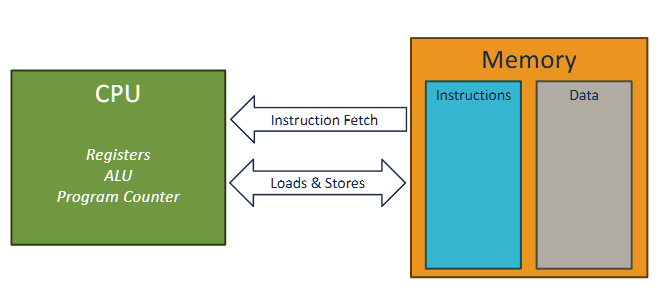
memory wall
Memory performance improved at a much slower rate than processor performance.
Memory access is expensive
- if a non memory operation uses 1 cycle, a memory access opeeration would take ~ 500 cycles
caching reduce CPI by access faster memories
memory techs
Note
volatile in the sense that they lose their information if the supply voltage is turned off. Nonvolatile memories, on the other hand, retain their information even when they are powered off (like ROM, flash memory, and hard disks).
- registers: 0.5 cycles (0.5ns)
- SRAM (static random access memory): 4-50 cycles (cache) (volatile, expensive, fast, used for cache)
- DRAM: 400 cycles (100ns) (volatile, cheap, slow, used for main memory)
- NAND (SSD): 100000 cycles
- hard disk

DRAM is sensitive to voltage distrubance (even for light exposure, interesting usage: digital cameras and camcorders), therefore, it needs to be refreshed every 64ms (while SRAM dont need to, but they need more transistors means less density and more power consumption). this is called refresh cycle, and it takes 100ns to complete. therefore, the effective access time of DRAM is 400 cycles + 100ns = 500 cycles. This leads to error-correction code (ECC) memory, which adds extra bits to detect and correct errors (like parity bits)
DRAM Acess steps and Structure
- the cells in DRAM:
- \(d\) super cells, each with \(r\) rows and \(c\) columns, so total cells = \(d \times r \times c\)
- Address pins: shared for row and column address
- Data pins: used to transfer data to/from memory controller
-
control signals: RAS (row address strobe), CAS (column address strobe), WE (write enable), OE (output enable) ✅ DRAM Access Steps To read or write data from DRAM:
-
Activate Row (RAS):
- Memory controller sends row address to DRAM.
- DRAM activates the entire row (called a row buffer).
-
Select Column (CAS):
- Memory controller sends column address.
- DRAM picks the specific column from the active row.
-
Data Transfer:
- For read: DRAM sends the data from the selected cell to the controller.
- For write: Controller sends data to DRAM to store in the selected cell.
-
Precharge:
- DRAM prepares for the next access by closing the row and resetting the sense amplifiers.
Practice question:
In the following, let r be the number of rows in a DRAM array, c the number of columns, br the number of bits needed to address the rows, and bc the number of bits needed to address the columns. For eachofthefollowing DRAMs, determine the power-of-2 array dimensions that minimize max(br,bc), the maximum number of bits needed to address the rows or columns of the array.

Answer:
Noted, the DRAM organization is defined by N supercells * w bits in each cell
to achieve the min(br, bc), where \(2^{br} * 2^{bc} = N\), we can set br = bc, so we have br^2 = N, therefore, br = sqrt(N), and bc = sqrt(N)

Memory pathway
- bus interface - connects to register files. connects to IO bridge via system bus
- IO bridge connects to memory controller, which connects to DRAM via memory bus
Memery Evaluation
calculate for CPI:
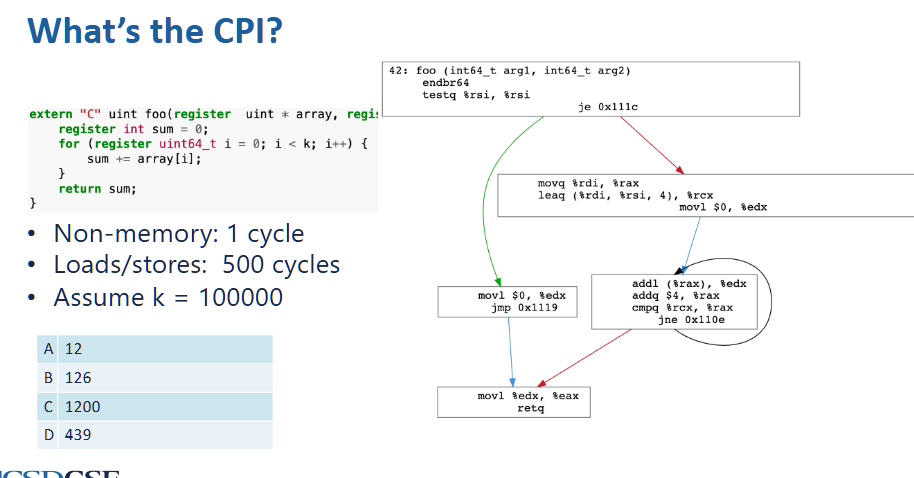
for 100000 k iterations, there are:
- 500 + 1 + 1 + 1 = 503 cycles per each iteration
there are 100000 * 503 = 50300000 CPI in total, and there are 3 + 3 + 2 + 4*100000 + 2 = 400010 dynamic instructions, so CPI = \(50300000 / 400010 = 125.7\) (or 503 / 4)
optimize memory access by parallelism (Amdahl’s law)
- we can only optimize the part x where it is parallezable. in this case,
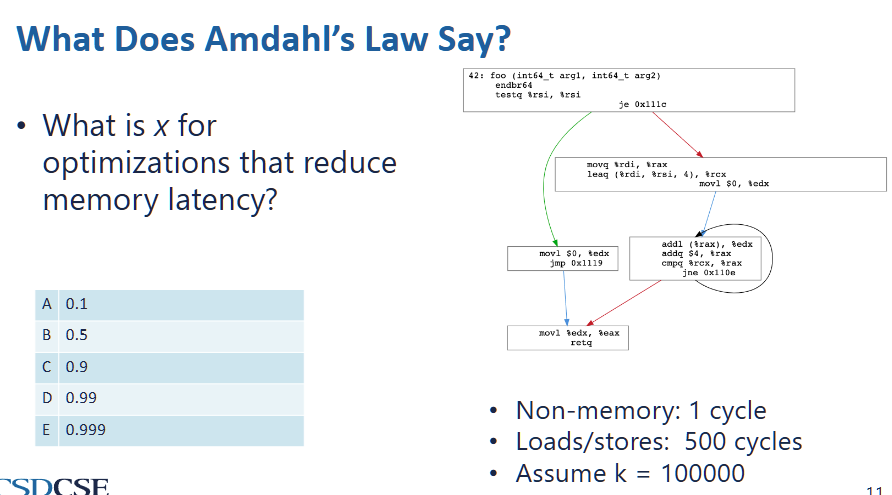
- since k is large, we can assume iterations takes the entire execution time
- inside each iteration,
addl (%rax) %edxis a memory access operation and its result edx is not used for later calculations, therefore it can be paralleized - therefore,
Memory access pattern/Cache
caching reduce CPI by access faster memories
cache
- faster than main memory
- usually made out of SRAM
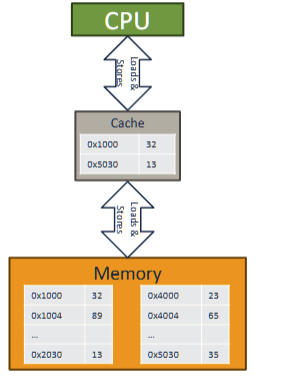
3 layers of cache in modern computer
with 64 bytes per cache line
a cache is small, but close to processor
memory access will try go to cache first
cache hit
cache miss - data is not in cache
multi level cache
last level cache - L3, LLC, the cache just before main cache
L1 (cloest to processor), L2, l3
memory locality
based on: future memory access is predictable based on past access
spatial locality - programs tend to access memory close in address to the data they have been accessed recently
- will divide an array into multiple data chunks, whenever a data in the chunk is loaded the entire chunk will be loaded
temporal locality - programs tend to access same data repeatedly
- if run out of space, evict cache lines based on evication policy. new cache is always added
calculate cache line
cache line: smallest unit of data that can be transferred between main memory and cache, consists of multiple consecutive bytes (spatial locality)
cache address: refer to location of memory block within a cache
- where 2^k is the cache line size
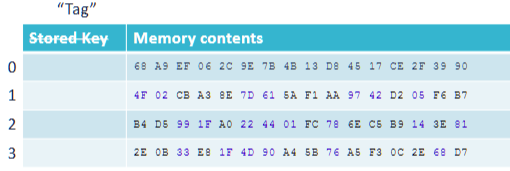
unified cache : A cache that holds both instructions and data.
example:
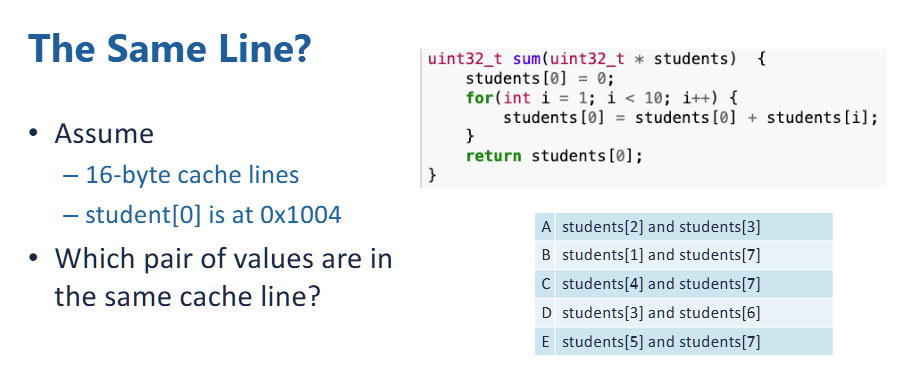
- each element in the students array is unsigned int of 32 bits, or 4 bytes.
- therefore, \(addr(student[i]) = 0x1004 + 4i\)
- suppose the cache lines is 16 bytes, the cache line number is
- since cache line is 16 bytes, therefore, there is 4 students object stored in each cache line,
- since the bit offset is 4 (2 ^ 4 == 16), therefore, the first 3 hex number defines a set,
- therefore, 0-2 (0x1004 - 0x100c), 3-6 (0x1010 - 0x101C), 7 - 10 is stored in the same cache line. since within each set, the first 3 hex digit is same.
- so answer is D
Cache as hashtable:
- to ensure O(1) access and store time
- use tags to acces the cache line, and then use index bits to access a specific location.
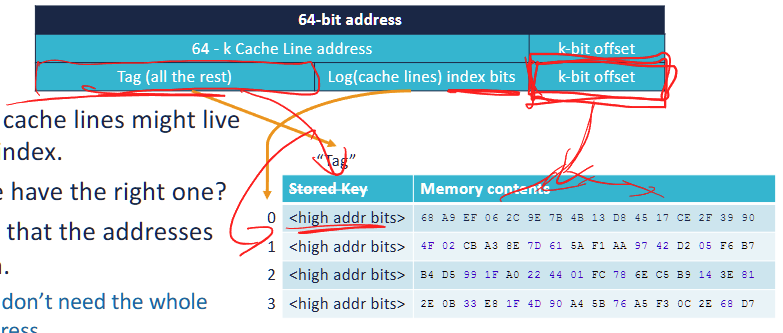
A 64-bit address is divided into three parts:
- Offset (k-bit offset)
- Determines which byte within a cache line to access.
- If the cache line size = 2^k bytes, the offset is k bits.
- Example: For 16-byte ( 2^4 ) cache lines, the offset = 4 bits.
-
Index (Log(cache lines) index bits)
The portion of an address that determines the possible locations of a cache line in the cache.
- Selects which cache line to use.
- If there are 2^n cache lines, the index requires n bits.
- Example: If the cache has 256 ( 2^8 ) cache lines, the index = 8 bits.
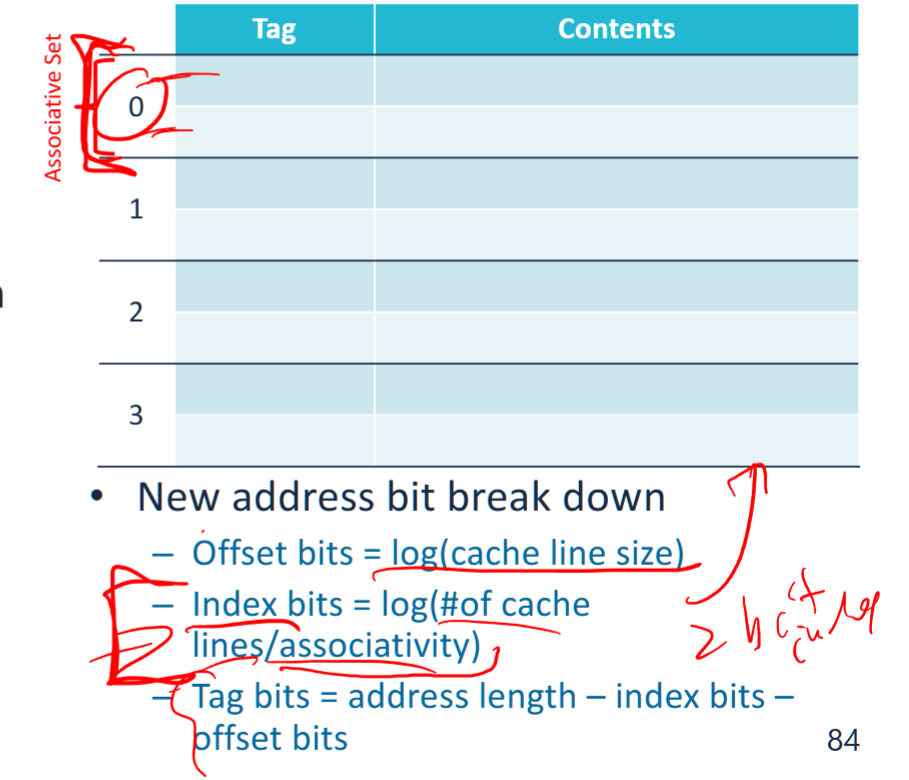
note: if use N-way set associative, the total number of indices = total number of associative sets = 2^n / N
-
Tag (Remaining bits)
- Used to differentiate memory blocks mapped to the same cache index.
- The CPU compares the tag of the requested address with the stored tag in the cache.
- Example: If 64-bit addresses, and offset + index uses 12 bits, then tag = 64 - 12 = 52 bits.
When accessing memory:
- The Index selects the cache line.
- The Tag stored in that cache line is compared with the tag from the address.
- If the tags match → Cache Hit (data is retrieved from cache).If the tags don’t match → Cache Miss (data is fetched from main memory).
Cache Metrics
memory latency: The time it takes to access a cache or main memory.
Memory bandwidth: The number of bytes per second that can be transferred to or from a cache or memory.
total CPI with cache misses
example :
In the absence of cache misses, processor takes an average of 2 cycle(s) to execute an instruction. If an L1 cache miss occurs, it takes an additional 18 cycles to access the L2.
On this processor, for a particular program an L1 miss rate of 30%. 5% of the instructions access memory.
What is the total CPI for the program?
type of cache misses
3Cs: Compulsory, Capacity, Conflict misses
compulsory misses: Misses that occur because the cache has not been accessed before
- reduce cache line size (therefore fetches less data on miss, and does not exploit spatial locality) increase compulsory misses
capacity misses: Misses that occur because the cache is too small.
- Misses that are not compulsory and would still occur in fully-associative cache with the same number and size of cache lines
conflict misses: Misses that occur because the indexing scheme and eviction policy caused a cache line to be evicted.
- Definition: Misses that are not compulsory and would not occur in a fully-associative cache the same number and size of cache lines
- increase cache line size (thus decrease the number of cache blocks and therefore same access pattern compete for fewer blocks) and reduce associativity increase conflict misses
- fully associative eliminate all conflict misses, but much more expensive
example
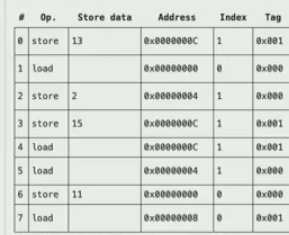
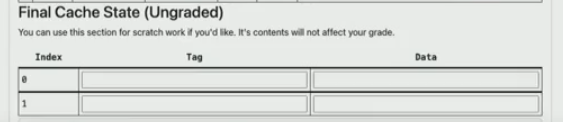
- 0 : store. so we have index: 1, tag = 001, compulsory miss
- 1: load, so store cache line index = 0, tag = 000, compulsory miss
- 2: store, index = 1, tag = 0, evict previous, compulsory (since it is first time access)
- 3: store, index = 1, tag = 1, evict previous, capacity miss (even it is fully associatetive, we cannot avoid this miss)
- 4: load, index = 1, tag = 1, cache hit
- 5: index = 1, tag = 0, conflict miss, because if we have fully associative cache, then result from 2, 3 will all be cached and this will be a cache hit.
- 6: index = 0, tag = 0, cache hit
- 7: index = 0, tag = 1, compulsory miss, first time access this
eviction
occurs when we need to make space in cache for a new line
eviction policy - determines when to evict a cache line
- in this course, always make room for new cache line
- has impact on cache hit rate
writeback - when a cache line is evicted and it is dirty (modified)
- cache write it back to next layer of memory hierachy if dirty
- load the cache line from the next level of memory hierachy
Evication policies
least recently used (LRU):
- the simple and good solution, evict the cache line that was used farthest in the past
- HOWEVER, it is hard to implement in hardware
random replacement policy:
evicts a block chosen at random, regardless of usage.
First In First Out (FIFO) replacement policy
policy evicts the block that was loaded into the cache the earliest.
example: (suppose only temporal cache)
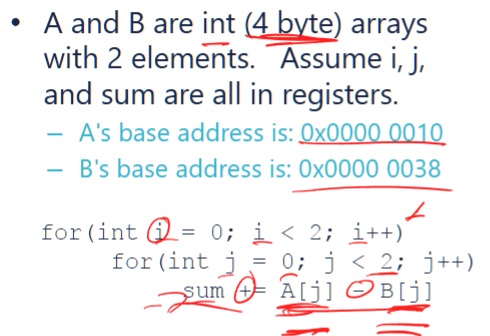
suppose the cache has 4 cache lines, 4 bytes per line, 32 bits addresss and 28 tag bits with 2 bit index and 2 bit offset
so this will perform:
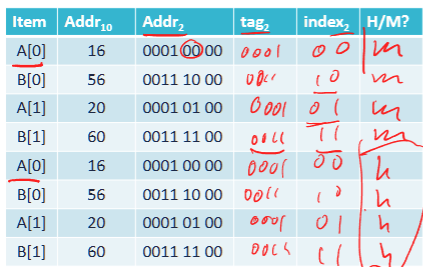
- first try to load A[0] with tag (the higher address bits > 4, in this case, 0-3 bits). so tag = 0001, then store the index bits (4 elements per cache line), so store 00 as 0.
- then cache miss B[0] with tag = 0011 and index bits = 00
- similarly, store A[1], B[1]. those are compulstory cache misses
- and second run all hits cache, therefore, hit rate is 50%
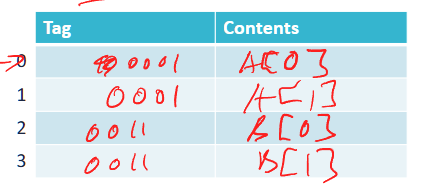
suppose there is only 2 lines in cache, then the cache hit rate is 0%, because in our case, when run out of cache lines, it will replace the first one inserted . cache miss due to capacity
suppose with spatial locality and index bits = 1, offset bits = 3, and #cache lines = 4, this time each cache line should have 2 elements (A[0], B[0]), and they should loaded together. in this case,:
- miss when laod A[0], a[1],A[0] is loaded to cache
- miss when load B[0], B[0], B[1] is loaded to cache
- all later 6 access hits cache
- therefore hit rate is 75%
same hit rate if loaded reversely (A[1]), since the entire block is loaded no matter what
suppose k (the number of iterations) for both loop increase to 4, and index bits = 1, offset bits = 3. then the cache hit rate is
- cache miss A[0] → load A[0], A[1]
- cache miss B[1] → load B[0], B[1]
- cache hit A[1], B[1]
- cache miss A[2] → load A[2] A[3] in place of A[0] A[1]
- cache miss B[2] →load B[2] B[3] in place of B[0] B[1]
- cache hit A[3], B[3]
- repeat again
therefore, the hit rate is 50%
Cache optimization Techniques
working set: data the programmer currently working on
operational definition: smallest cache size for which there are few capacity misses
direct-mapped cache
each memory address maps to exactly one cache line.
suppose 2 cache lines, 1 index bit, which of following has higher cache hit rate?
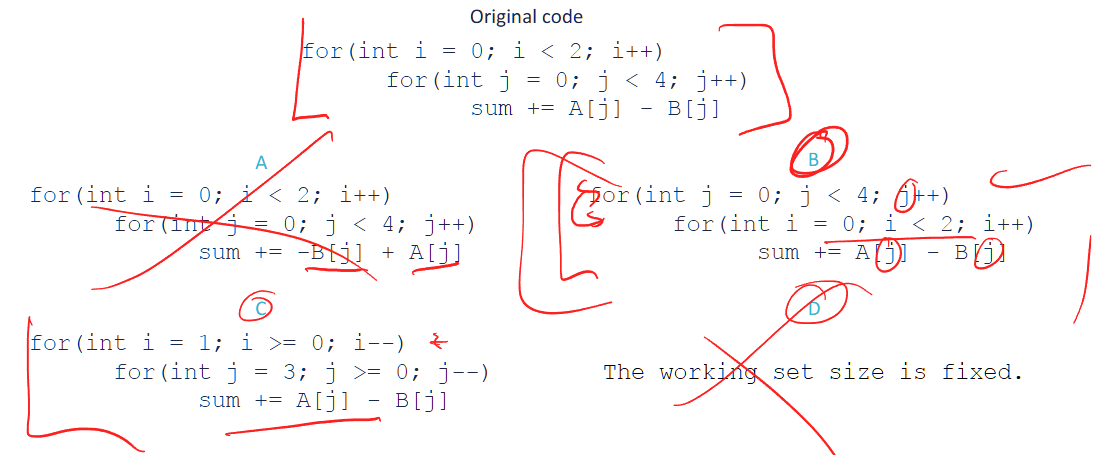
original: 50%
A: 50%
B: 75% , note: cache miss A[0], cache hit A[0], A[1], A[1]. repeat for all
C: 50%
loop interchage / renesting:
the working set size: 16 bytes = 4 ints * 4 bytes per int + 4 ints * 4 bytes per int
- Although
A[]andB[]together take 32 bytes in total, the loop splitting technique ensures that only part of them is in use at a time. - The inner loop operates on
A[j]andB[j], keeping memory usage lower at each step. - This reduces the active working set size at any given moment.
loop renesting + loop spliitng:
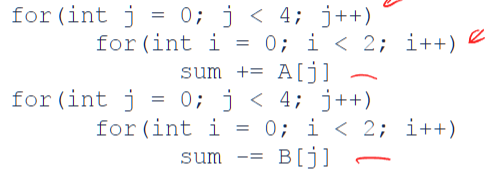
we only need 1 cache line with 1 content (one content in a cache line)
- miss A[0], hit A[0]
- ….
so 50%hit rate
Cache conflicts
- there is room for cache, but indexing is too restrictive, causing coliision in hash table
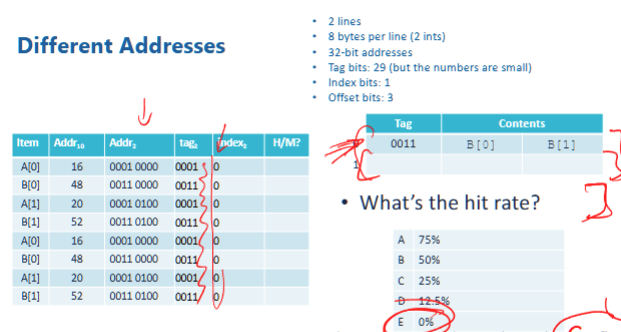
- in this case, since index biits is 1, we only take the 4th bit for indexing. however, look at each case:
- 16 =
0001 00004th bit is 0 - 20 =
0001 01004th bit is 0 - …
- notice all 4th bit is zero, therefore, all index is 0, and therefore only 1 content for each tag. so they can only use one cache line. therefore, all cache would have the same index, so all will stuck in the same cache line, and not use anything else. therefore, each cache is overwritten. so no cache hit
- 16 =
associativity, fully associative cache
- does not use index, but require to search all cache lines for matched tags
- allows to store multiple blocks in a cache set simutaneously
- fully associative cache eliminate conflict misses
cache with associativity
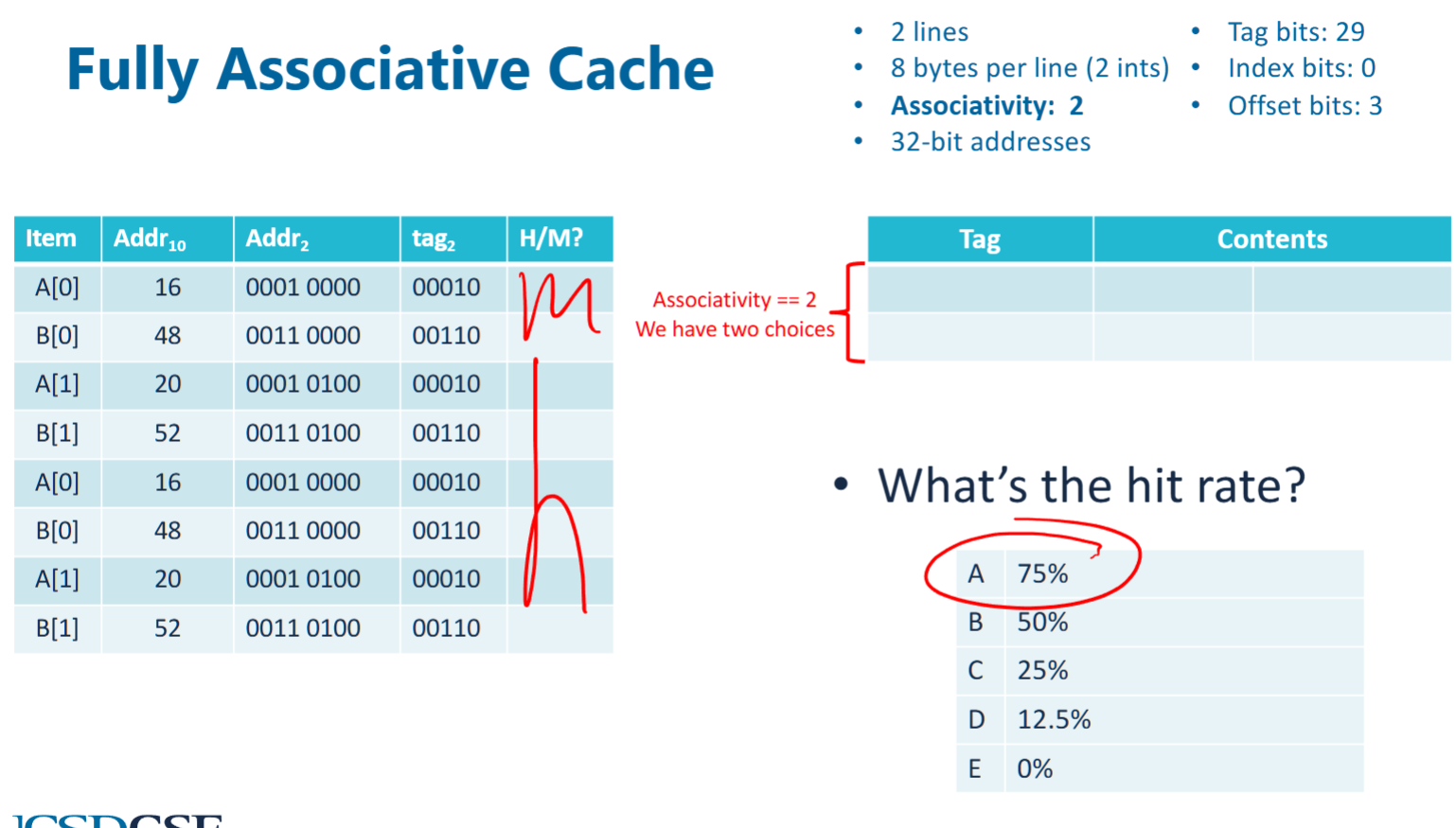
- suppose associativity = 2, which means 2 of the cache lines do not use index but search all associated cache lines when tag is inquered
- therefore, first cacheline would store A[0], A[1], second would store B[0], B[1]. the first A[0], B[0] are compulsive misses, others are all cache hits
hybrid associative cache (N-way cache)
- the index becomes the index of an associative set. an associated set have N cachelines, and they are associated.
- and we can implement LRU evication within a set
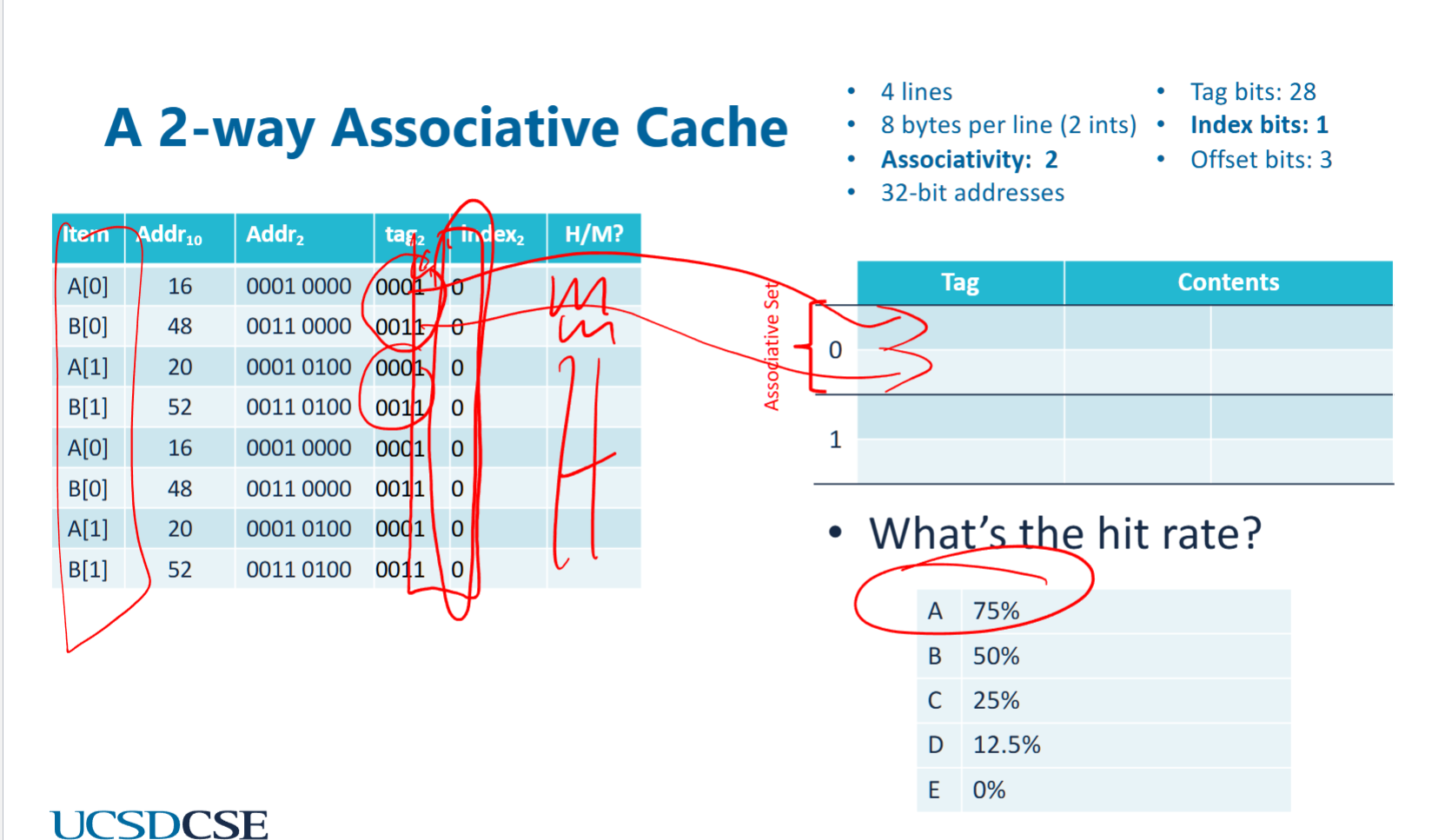
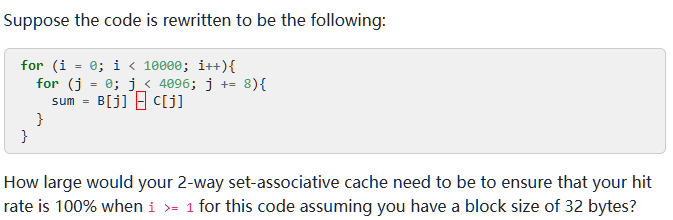
- although index bit are all 0. all elements are cache in the first associative set.
prefetching
- bring data into the cache before its requested
prefetch (%eax)
Cache access behavior plot
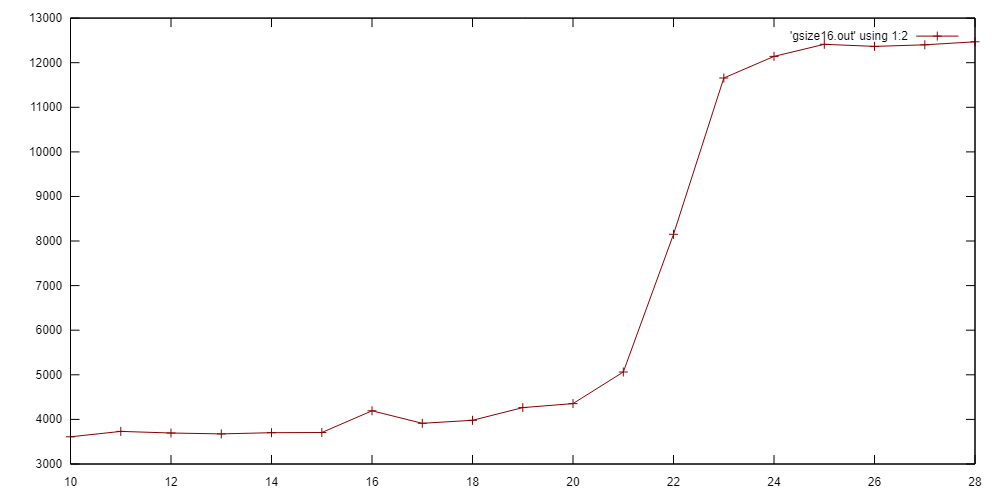 In this program we linearly access an array of memory of size 2^N bytes (2^(N-2) integers). We count the total time.
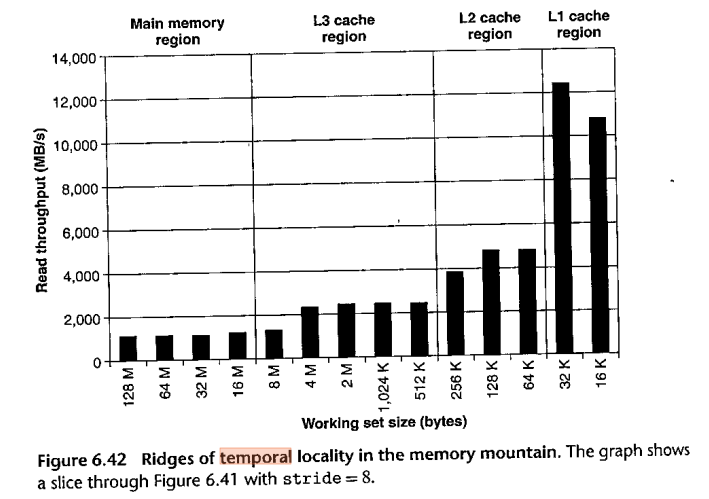
virtual memory
address space
each program runs as if it has its own memory. in 64 bits machine, address space should be 2^64 bytes.
however, we can allocate more memory space than the entire physical space if we dont operation on them. this is virtualization
virtualization
taking a physical resource (memory) and make it appear to behave differently than it does, usually more plentiful (eg: an program can have >42TB address space on 16GB of memory)
it takes limited physical memory and use it to build nice and easy address management spaces
virtual to physical mapping
- memory virtualization works on pages, ~4KB
- each process has a page table to store virtual to physical mapping for address space
- and permission to CRUD memory
- programs can only operates on virtual addresses
page
A page is a fixed-sized block of memory used in a virtual memory system. It is the basic unit of data transfer between RAM (physical memory) and storage (disk/SSD). Pages allow the operating system (OS) to efficiently manage memory and implement paging-based virtual memory.
- every process has a single page table
translation lookaside buffer (TLB)
- The TLB is usually pretty small and highly (sometimes fully) associative.
- The TLB lookup has to complete before instruction can finish executing.
- To enforce memory protection.
- Illegal accesses cause SIGSEGV
- The hit rate needs to be high
page: a unit of address translation
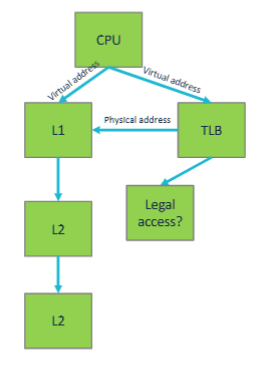
- TLB usually have high hits, .
- hits are fast
- dont impact L1 time
- on miss, CPU asyncly performs a lookup in the OS manageed page table
- the table is in memory, so further cache misses are possible
- if L1 is too small
- add L2, L3 TLB (unrelated to L2, L3 cache)
- adopt even larger page sizes
page offset
specifies the exact byte location within a range
virtual page number (VPN)
the index of a virtual page in a virtual address space The VPN is used in conjunction with the page table to look up the corresponding physical page.
- in a 32 bit virtual address space with 4KB pages, VPN is 20bits, \(= 32 - \log_2(4*1024) = 32 - 12 = 20\)
physical page number (PPN)
The PPN (Physical Page Number) represents the index of a physical page in the physical memory.
- The OS and Memory Management Unit (MMU) use the VPN to find the corresponding PPN in the page table.
- The PPN + Page Offset forms the physical address.
- In a 32-bit physical address space with 4KB pages, the PPN consists of 20 bits.
convert from VPN to PPN
- PPN has a smaller range compare to VPN
- VPN is mapped to PPN, but not reverse versa. it is a one way map direction from VPN to PPN. there could be multiple VPN that points to same PPN
- the page offste of PPn and VPN is same
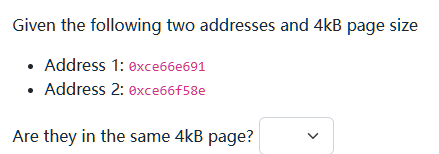 the page offset bits = log_2 (4*1024) = 12, therefore, the lower 3 hex value is ignored (because page offset is ignored). then, since the remaiing
 ce66e ≠ ce66f , they belong to different page
Your program has a TLB miss rate of 0.03% and a cache miss rate of 0.1%. TLB misses add 12 cycles to the execution time of an instruction while cache misses add 11 cycles to the execution time of your program.
You have to decide between optimizing to reduce cache misses or TLB misses. Which should you optimize for?
(a)Cache misses
(b)TLB misses
A, because cache miss has higher miss rate?
example:
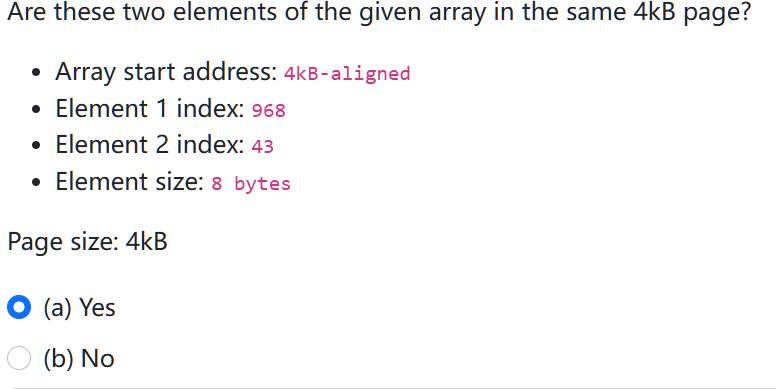 - since the array start address is 4kb-aligned. therefore, address intervals are:
 0-4kb, 4kb-8kb
- each element is 8 bytes, in a single page of 4kb, therfore, there are 4096 / 8 = 512 elements.
- therfore, element 1 is in second page, while element 2 is in first page, not in the same page
summary
- bigger cache
- will generally have higher hit rates, lower cache miss
- let cache exploit spatial locality,
- … reduce compulsive misses
- increase associativity
- reduce conflict misses
- prefetcher
- reducer compulsory misses
- ideally, cache should be large enough to fit all data in working set